Expédier un article
Messages

Toutes les annonces de francesco

Sur tutti.ch depuis 22.10.2024

5 annonces

Trier selon

Linksys WRT 3200 ACM Router
4
Unterägeri, 6314, 27.07.2026

Linksys WRT 3200 ACM Router

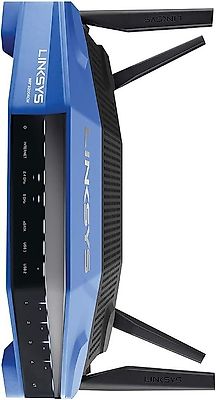
The Linksys WRT3200ACM AC3200 MU-MIMO Gigabit Wi-Fi Router is a dual-band 3×3 AC1900 class router with one 5 GHz radio that supports contiguous 160 MHz bandwidth. It delivers solid wireless throughput, hitting 524.165Mbps peak and never dipping below 300Mbps download even in tough test locations. Overview of Linksys WRT3200ACM AC3200 The Linksys WRT3200ACM is a dual-band router designed for high performance. It supports MU-MIMO technology, allowing multiple devices to connect simultaneously without sacrificing speed. The router operates on both 2.4 GHz and 5 GHz bands, with a maximum throughput of 600 Mbps on 2.4 GHz and 2600 Mbps on 5 GHz. Key Features Performance Maximum Link Rate: 3200 Mbps (combined) Tri-Stream 160 Technology: Doubles the bandwidth on the 5 GHz band. Antenna Configuration: 4 external antennas for improved range and coverage. Connectivity Ports: 4 x Gigabit Ethernet ports 1 x Gigabit WAN port 1 x USB 3.0 port 1 x USB 2.0/eSATA combo port Customization Open Source Support: Compatible with OpenWrt and DD-WRT for advanced users. User Interface: Intuitive web interface and mobile app for easy management. Performance Testing In various tests, the WRT3200ACM showed strong performance, achieving peak download speeds of over 524 Mbps in optimal conditions. Conclusion The Linksys WRT3200ACM is a solid choice for users seeking high-speed internet and extensive features. Its dual-band capabilities and support for multiple devices make it suitable for homes with heavy internet usage. However, potential buyers should consider their specific needs and the performance of competing models in real-world conditions. Design and Build Quality The Linksys WRT3200ACM boasts a classic design reminiscent of the original WRT series, with its blue and black color scheme giving it a distinctive, if somewhat nostalgic, appearance. The router features four detachable antennas, which are strategically positioned to maximize coverage. The build quality is solid, with a sturdy plastic casing that feels durable enough to withstand the rigors of everyday use. Key Features and Specifications At the heart of the Linksys WRT3200ACM is a powerful 1.8GHz dual-core processor, which helps the router manage multiple data streams simultaneously. This is particularly important for a router with MU-MIMO (Multi-User, Multiple Input, Multiple Output) capabilities, as it allows for more efficient data handling when multiple devices are connected. Other notable specifications include: Tri-Stream 160 technology, effectively tripling the bandwidth on the 5GHz band to achieve faster speeds. 512MB of RAM and 256MB of flash memory. Four Gigabit Ethernet ports for wired connections. One USB 3.0 port and a combo USB 2.0/eSATA port for sharing storage devices or printers. The Linksys WRT3200ACM shines when it comes to speed and throughput. In our tests, the router delivered impressive speeds, particularly on the 5GHz band, where it took full advantage of the Tri-Stream 160 technology. The 2.4GHz band also performed well, providing solid coverage and reliable connectivity even with multiple devices connected. Open Source Firmware Compatibility For those who like to tinker with their routers firmware, the Linksys WRT3200ACM is compatible with open-source firmware options such as OpenWRT. This allows for a higher degree of customization and the ability to add features not included in the stock firmware.
120.-
Unterägeri, 6314, 27.07.2026

Router WRT320 ACM + WRT004ANT high gain antenna kit

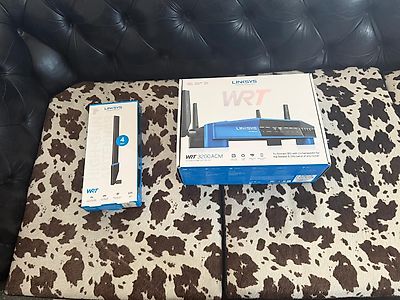
The Linksys WRT3200ACM AC3200 MU-MIMO Gigabit Wi-Fi Router is a dual-band 3×3 AC1900 class router with one 5 GHz radio that supports contiguous 160 MHz bandwidth. It delivers solid wireless throughput, hitting 524.165Mbps peak and never dipping below 300Mbps download even in tough test locations. Overview of Linksys WRT3200ACM AC3200 The Linksys WRT3200ACM is a dual-band router designed for high performance. It supports MU-MIMO technology, allowing multiple devices to connect simultaneously without sacrificing speed. The router operates on both 2.4 GHz and 5 GHz bands, with a maximum throughput of 600 Mbps on 2.4 GHz and 2600 Mbps on 5 GHz. Key Features Performance Maximum Link Rate: 3200 Mbps (combined) Tri-Stream 160 Technology: Doubles the bandwidth on the 5 GHz band. Antenna Configuration: 4 external antennas for improved range and coverage. Connectivity Ports: 4 x Gigabit Ethernet ports 1 x Gigabit WAN port 1 x USB 3.0 port 1 x USB 2.0/eSATA combo port Customization Open Source Support: Compatible with OpenWrt and DD-WRT for advanced users. User Interface: Intuitive web interface and mobile app for easy management. Performance Testing In various tests, the WRT3200ACM showed strong performance, achieving peak download speeds of over 524 Mbps in optimal conditions. Conclusion The Linksys WRT3200ACM is a solid choice for users seeking high-speed internet and extensive features. Its dual-band capabilities and support for multiple devices make it suitable for homes with heavy internet usage. However, potential buyers should consider their specific needs and the performance of competing models in real-world conditions. Design and Build Quality The Linksys WRT3200ACM boasts a classic design reminiscent of the original WRT series, with its blue and black color scheme giving it a distinctive, if somewhat nostalgic, appearance. The router features four detachable antennas, which are strategically positioned to maximize coverage. The build quality is solid, with a sturdy plastic casing that feels durable enough to withstand the rigors of everyday use. Key Features and Specifications At the heart of the Linksys WRT3200ACM is a powerful 1.8GHz dual-core processor, which helps the router manage multiple data streams simultaneously. This is particularly important for a router with MU-MIMO (Multi-User, Multiple Input, Multiple Output) capabilities, as it allows for more efficient data handling when multiple devices are connected. Other notable specifications include: Tri-Stream 160 technology, effectively tripling the bandwidth on the 5GHz band to achieve faster speeds. 512MB of RAM and 256MB of flash memory. Four Gigabit Ethernet ports for wired connections. One USB 3.0 port and a combo USB 2.0/eSATA port for sharing storage devices or printers. The Linksys WRT3200ACM shines when it comes to speed and throughput. In our tests, the router delivered impressive speeds, particularly on the 5GHz band Open Source Firmware Compatibility For those who like to tinker with their routers firmware, the Linksys WRT3200ACM is compatible with open-source firmware options such as OpenWRT. This allows for a higher degree of customization and the ability to add features not included in the stock firmware. WRT004ANT high gain antenna kit $80 This 4-pack of easy-to-install, high-gain antennas enhances the signal strength and range of your wireless router. Providing greater coverage than standard antennas, they are optimal for mobile device connectivity. The high-gain antennas operate on both the 2.4 and 5 Ghz bands, providing up to 7dBi on the 5 Ghz band - increasing Wi-Fi signal strength, reducing interference, and boosting speeds. This Omni-directional design extends your Wi-Fi range, delivering expanded wireless coverage in your home. The antennas are an easy add-on. Simply detach your router's factory antennas and attach the high-gain antennas using the RP-SMA connectors.
200.-
Unterägeri, 6314, 26.07.2026

Creality Ender 3 V2 NEO New in the original box never used

Creality Ender 3 V2 Neo Review The Creality Ender 3 V2 Neo is the 2022 iteration of Crealitys popular Ender 3 series of 3D printers. Building upon the success of the Ender 3 V2, the V2 Neo ships with a number of improvements and upgrades at nearly the same price, aiming to compete with other new entries in the budget 3D printer space In this review, well take a look at how to assemble the Ender 3 V2 Neo, whether the Ender 3 V2 Neo is easy to use, and the overall print quality you can expect. . Assembling the Ender 3 V2 Neo General Overview of Assembly We were pleased to see that the connectors are all labeled and keyed to only insert one way, making the assembly process very beginner friendly. The instructions indicate which connectors are 6-pin or 2-pin and how many wires are in each connector, making it easy to identify the right connector. While the text and illustrations of the provided paper guide are very small, theres a full manual on the included micro SD card which is much more complete with text and illustrations that are far easier to readits worth looking at this on a computer or phone to aid in assembly.. The connectors all branch off of a single cable bundle running out of the mainboard housing in the base. This cable bundle is nicely sleeved coming out of the base to the hot end. It splits out to a ribbon cable and further separates out to a series of connectors near the extruder. Assembly Process Assembling the Ender 3 V2 Neo took about 15-20 minutes, rather than the hour or more that the previous Ender 3 models could take, and is definitely more beginner friendly. While we recommend you use Crealitys instructions for the assembly, well walk through the assembly process to give you an idea of what it entails. Before turning the printer on, verify the voltage is set correctly on the power supply. Like most 3D printers, the Ender 3 V2 Neo is equipped with a power supply that does not automatically adjust to incoming voltage. This may be a surprise to those new to 3D printing and used to computer power supplies. Extruder advance indicator knob, Z axis stepper motor connection and cable ties on extruder and sleeved cable. Make sure you set the input voltage properly, or the printer will not turn on. Ender 3 V2 Neo New Features The CR-touch sensor probing the bed as part of the mesh leveling procedure. Using the CR-touch Auto Bed Leveling Although the Ender 3 V2 Neo is equipped with CR Touch automatic bed leveling, its still a good idea to roughly level the bed manually, especially before your first print. Auto leveling works best on a bed thats already close to level. Updated Hot End Creality introduced a new hot end for the Neo series, with a couple of notable updates over the previous design. The new enclosure is easy to see in images of the printer, but a less obvious feature is that the heat sink has been redesigned to help prevent filament jams. Jams are typically caused if filament gets hot too soon and melts within the heatsink section before it reaches the nozzle, so improved cooling of the portion before the heated nozzle is an important new feature that should improve reliability. We were also pleased to see a more robust connector for the PTFE tubing at the top of the hot end - we have seen these fail on some printers and need to be replaced, but the new one appears to be fully metal and less prone to failure. Previous designs used small metal teeth to hold the tube in place, which would break and fail over time. The redesigned heat sink and new metal PTFE tube coupling are key improvements to the Ender 3 V2 Neos hot end.
130.-
Unterägeri, 6314, 26.07.2026

Fujitsu Esprimo C710 I7 3.4gb 8gb GTX 745 4 Gb BD 1.5 tb HD

Low Energy consumption The computer has a versy small form factor and an unexistent noise ... is pretty silent 8 Gb ram (exp to 32) cpu Intel Core i7 3770 8 core 3.4 Ghz hd sata 1.5 tb (ssd disk in parallel 128 gb +30 eu) Blu-ray / DVD Ntwork Card 1 gb Intel 82579V Grafic Gaming GTX 745 4 Gb Ram Beautiful small pc for Mediastation or Gaming run flawlessly eventual additional parts SSD 128 gb 30 chf Monitor 17 " +30chf Monitor 22" +80chf
100.-
Unterägeri, 6314, 26.07.2026

Linksys (cisco) router EA 9500

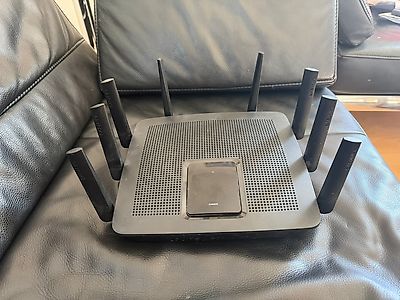
Selling a Mint well tested entirely running Linksys (cisco) router EA 9500 8 ports 1gbit switch 1 gb ethernet internet connection VERY SOLID i did not need to reboot it a single time in its life With a very fast and powerful wifi can cover big apartment and small offices Also 8 port gigabit connection can connect servers and wired connectivity of a small office The Linksys EA9500 Max-Stream AC5400 MU-MIMO Gigabit Router is all about "big." It's designed for large households, physically, it's huge.Powered by a dual-core CPU and featuring eight external antennas, this monstrous tri-band router packs Multi-User Multiple-Input Multiple-Output (MU-MIMO) streaming, eight Gigabit LAN ports, and plenty of management settings is a very solid performer Design and Features It is among the largest routers we've seen, The black enclosure holds eight adjustable, non-removable antennas (three on each side and two on the back) and has a status panel with eight LED bars that flash when the router is booting up or when a firmware upgrade is taking place and remain solid when the router is up and running. There's a wealth of I/O ports around back, including eight Gigabit LAN ports, a WAN port, a USB 3.0 port, and a USB 2.0 port. They are joined by a Reset button and a Power button. The right side of the router holds a WPS button and a Wi-Fi (enable/disable) button. Under the hood is a 1.4GHz dual-core processor and 802.11ac circuitry with three independent Wi-Fi bands (one 2.4GHz band and two 5GHz bands). The 2.4GHz band can reach (theoretical) maximum speeds of up to 1,000Mbps, and each 5GHz band can reach up to 2,166Mbps. The EA9500 supports MU-MIMO data streaming, which transmits data simultaneously, rather than sequentially, to MU-MIMO-compatible clients, and beamforming, which sends data signals directly to clients, rather than broadcasting over a wide spectrum. It also supports Seamless Roaming technology when paired with a Linksys Max-Stream Range Extender. With Seamless Roaming, the router and the extender work together to automatically connect you to the strongest signal as you move from room to room. The EA9500 uses the same Web-based Smart Wi-Fi management interface used on the Linksys EA7500 Max-Stream AC1900 MU-MIMO Gigabit Router . It can also be managed using the Smart Wi-Fi mobile app. The Main page contains Smart Wi-Fi Tools and Router Settings on the left, and eight widgets on the right that you can click to access Wireless, Guest Access, External Storage, Media Prioritization, and Parental Control settings. There's also a Network Map that displays all connected devices. Linksys EA9500 Max-Stream AC5400 MU-MIMO Gigabit Router The Guest Access page is where you go to enable guest networking and create passwords for both bands, and the Parental Controls page lets you block Internet access and create access schedules for select clients. Wireless settings allow you to create network names and passwords for each band, assign a security mode (WPA2 Personal, WPA2 Enterprise, or WPA2/WPA mixed), and select a network mode. The Media Prioritization page offers drag-and-drop QoS settings for applications and games, and Security settings provide IPv4 and IPv6 firewall protection, Internet filtering, and VPN pass-through capabilities. Installation and Performance 795336993 The EA9500 performed admirably on our throughput tests. Its score of 98.9Mbps on our 2.4GHz close-proximity (same-room) test Conclusion The Linksys EA9500 Max-Stream AC5400 MU-MIMO Gigabit Router may cost top dollar, but you get a lot of features and solid performance for your money. Its eight Gigabit LAN ports provide plenty of room for connecting multiple PCs, NAS drives, printers, and any other wired networking device, and its user-friendly interface offers a generous array of settings to help you manage and optimize your network.
100.-